Evidence of curriculum governance
Led the annual programme-board review for 12 course units.
Sober monochrome chrome. Color reserved for data. One family, one focus ring, one radius. Every component below mounts the real primitive from @evalgist/design-system — if the package drifts from the spec, this page breaks.
Every AI judgment is anchored to a literal quote or reference from the source. The product surfaces evidence so the human can defend the decision to a candidate, a student, or an auditor.
External surfaces name concrete data handling: EU storage, no AI-provider retention, public service-provider lists, and deletion rules for extracted document text. Avoid “privacy by design” unless the page also shows what that means.
Chrome is slate-and-white. Color is semantic and used only on data — confidence bands, status, score. Decoration stays monochrome.
Percentages are deliberately not shown. Candidates fall into Suggested match, Possible match, or Weak match — a shape a reviewer can argue about, not a decimal that pretends to be truth.
Geist Sans for everything UI. Focus is a neutral 2px outer ring at 30% opacity — never chromatic, never changes the border. Radius scales by role: 14px for Card, 10px for mid-surfaces (Dialog, Alert), 8px for controls (Button, Input, Badge), 6px for inline items, 9999px for pills. Headlines and titles use text-balance; body copy and descriptions use text-pretty. Never let a single word strand on the last line.
Short, mechanical, monochrome. 150–200ms transitions on hover. No bounces, no springs, no fade-ins on page load. Accent animation is reserved for state: the footer live dot, the “Processing” chip.
Ambient decoration — the hero grid, background patterns — declares the text region as an exclude zone. Inside that rectangle, nothing animates. Around it, a feather band scatters the boundary so decoration dissolves into the copy instead of butting against a straight edge. The text region is authoritative; ornament is probabilistic outside it. On phones, decoration is cut entirely — the text takes the full width and reads without peripheral motion.
Chrome is fully monochrome. The moment color appears, it means something — a band, a status, a verdict, or the one brand accent, which is brand and never state. Semantic color is always paired with a label; never the only indicator.
The accent belongs to the brand, not to data. It appears as marketing and brand furniture (eyebrow dots, links, article rules, OG cards, illustration highlights) and as link color in product chrome — never inside the mark, never on band pills or buttons, and the focus ring stays neutral. Utilities: text-brand, bg-brand-soft, border-brand-border.
Geist Sans for UI, Geist Mono for tabular and code-ish content. The scale is Tailwind-aligned and used sparingly — three sizes per screen is enough almost always.
11px, semibold, uppercase, 0.15em tracking. Default color is fg-3; override with --eg-eyebrow-color for the rare dark variant, as shown above.
Shape is quiet — the point is content, not chrome. Shadows are hover-reveal only; nothing glows, nothing floats at rest.
Card padding is p-6 (24px). Section stack is space-y-6. Page max is 72rem (max-w-6xl). Everything else falls out of the 4-pixel grid.
Dashboard, settings, credits, new shortlist, shortlist setup. max-w-6xl mx-auto px-6 py-6. Card-based, page-level scrolling. Users pass through quickly.
Candidate review. Full-width master-detail with independent panel scrolling. Users spend time here.
One icon set, stroke-based, neutral weight. Always paired with a label or used in a known slot. No sparkle, no emoji, no unicode as icon (except → and · as glyphs).
Sober, self-assured, lightly dry. Short sentences. Closer to The Economist than to TechCrunch. No superlatives, no startup language, no emoji, no exclamation marks.
A short list of the mistakes we keep catching in review. Each one looks small; together they are what separates 'looks like Evalgist' from 'looks like a dashboard'.
Never use an accent color on chrome — no colored nav, no colored cards, no colored borders. When in doubt, use slate.
Don't show 87%. Show Suggested match. A reviewer can argue about a band; a decimal pretends to be truth.
The active sidebar item gets font-medium + text-foreground. No pill background, no left bar, no rounded highlight. The absence of decoration is the decoration.
Every empty state tells the reader what's there and what to do next. Two short sentences. No mascot, no “Oops!”, no exclamation.
Every button below is the real <Button> from @evalgist/design-system. If a variant gets renamed or removed, this page will stop compiling.
Every badge below is the real <Badge> from the package — if the cva config drifts, these chips will look wrong or the build will fail.
Real <Input>, <Label>, and <Select> from the package. The focus ring is the canonical neutral 2px at 30% — never chromatic.
Borderless single-line fields for inline rename and criterion editing. Focus restores input chrome; blur on an empty trimmed value reverts when revertOnEmptyBlur is set.
All real <Card*> primitives from the package. Padding is p-6 (roomy) or p-4 (dense).
Batch A and B primitives cover status, menus, tables, confirmations, forms, and notifications. Product-specific rows, filters, and panels stay in the app.
Alert lays its children out on a two-column [icon, content] grid, and only AlertTitle and AlertDescription opt into the content column. Anything else you add — an actions row, an error line — must carry col-start-2 itself, or it renders inside the 16px icon column. Outline and ghost buttons keep a neutral foreground, while the warning surface supplies their hover colour.
Example assessment
Read-only data with synthetic answers, suggested scores, and quoted evidence.
The destructive variant carries a faint tinted surface and edge so an error reads as a distinct surface, not just red text; the body and the per-item manifest stay neutral for legibility. Compose a two-column manifest inside AlertDescription (filenames in an aligned column, reasons in the second) and put the dismiss in AlertAction.
The rest of your upload was saved — re-upload the 2 files below.
| Candidate | Band | Evidence | Status |
|---|---|---|---|
| Anika Verbruggen | Suggested match | 4 quotes | Reviewed |
| Milan Peeters | Possible match | 3 quotes | Needs check |
| Sara Benali | Weak match | 2 quotes | Queued |
Keep this page open while Shortlist reads the file and prepares the criteria review.
Job_Posting.docx
Reading file and preparing criteria review.
Long-running work switches to an indeterminate state without inventing precision.
A second source stacks as its own row via additionalFiles.
Pharmacogenomics_case.docx
File read. Finding questions and grading guidance.
Correction_key.docx
Correction key. Reading points and expected answers.
Sidebar, SidebarProvider, SidebarToggle, and SidebarNavLink live in the design system. Brand lockup and identity stay app-local. Active state is weight, not a pill. See section 16 for the page-level contract and the PageHeader primitive that pairs with this chrome.
Pages render their H1 via PageHeader. The topbar carries utility plus page-provided route context: a Dashboard back-link for creation wizards, a single immediate-parent back-link on nested detail routes, or a compact breadcrumb only when a multi-route wizard needs to expose its intermediate steps. Ordinary routes leave the left slot empty. Reading the URL to reconstruct the current route name in the topbar remains forbidden.
Billing
Track evaluation credits, monthly usage, and screening outcomes.
States differ in contrast, not hue. Brand contract is sober — no mint, no amber, no red.
Pass a node for editable titles, badge rows, or rich descriptions. Strings keep the default chrome.
bg-slate-100 / --eg-mutedPage background. Slightly grey, never white.
bg-card / --eg-cardContent surface. One step lighter than canvas.
bg-card / --eg-cardSidebar & topbar. Same tier as cards, separated by a single border.
<PageHeader title="…">. Nothing else duplicates the route name.Confidence is a band, not a percentage — shown in English, backed by evidence. Progress is the <Progress> primitive; the band is a <Badge>.
<EmptyState> is the section-level empty primitive — drop it inside a section that has no rows yet. The action slot accepts any React node so the design system stays Next-agnostic; consumers compose their own link primitive.
The admin settings API did not return model settings.
Run your first analysis to see what your credits produce.
Create the first shortlist or inspect the built-in sample before uploading any files.
Positions will appear here after users create them.
Operational logs appear here when the app records warnings or errors.
A page-header strip used on dashboards. The icon is optional and quiet; the colored bubble is gone. Destructive tone applies to the value when a number is genuinely bad — never as decoration.
Shortlists
10
Resumes screened
323
Credits
14
Credits
4
Buy more credits
Resumes screened
323
Across 12 shortlists
Credits
0
Buy more credits
Used on commerce and billing surfaces to reassure right where the decision happens. Middle-dot separators, muted text, screen-readers skip the separator. Three to five items reads best — past that, split or trim.
Credits valid 12 months Non-refundable No subscription Stripe receipt
Credits valid 12 months Non-refundable Card or Bancontact accepted No subscription Stripe receipt
GDPR-compliant EU data residency ISO 27001
`useAutoCycle()` drives the active index, owns prefers-reduced-motion, and pauses on hover or focus. `<AutoCycleProgressBar>` and `<AutoCyclePauseToggle>` give consumers a ready-to-place control. The bar pauses in place — hover does not reset progress.
{...cycle.containerProps} — that wires pointer and focus pause.<AutoCyclePauseToggle cycle={cycle} /> next to the content title so the affordance is discoverable.<AutoCycleProgressBar cycle={cycle} /> along the bottom of the same container — the bar drives the cycle.cycle.active and cycle.jumpTo(i) for the click-to-pin affordance. Set aria-current on the active item.prefers-reduced-motion: reduce, the bar and toggle render nothing and the cycle does not advance. Static state shows item 0.Native <details> so it works without JavaScript, collapses by default, opens to one item at a time without state management. Use on commerce, pricing, and onboarding surfaces — anywhere a small set of repeat questions blocks a decision.
One surface for every irreversible action across products. The industry consensus — Mintlify, Clerk, GitBook, Hume, 1Password, Stripe — is no leading icon: the destructive button is the sole accent, which also matches our monochrome-chrome rule that colour is reserved for the action. The typed-confirmation guard is the safety feature; bypass it and the user can delete data with one click.
Surfaces dirty-state in an edit flow and offers the resolution actions inline. On narrow screens, status leads a two-column action row and a final unpaired action spans both columns; desktop returns to one compact line. Pulse dot communicates 'something is pending' without urgency.
Unsaved changes
Criterion deleted
Up to date
Nothing to resolve
Pending review
Analysis running
Quota exceeded
Saved
Unsaved changes
Use in edit flows where the user can leave the page mid-change. The bar is fixed to the viewport bottom by default; passclassName="static left-auto translate-x-0" to demo it inline (as on this page). One primary action only — never two. Avoid for global app toasts; the toast primitive is the right tool for transient, non-blocking confirmations.
The icon-tile-plus-row pattern used by setup strips and task checklists. State lives in the icon tile and, when current, in a single hairline on the row. The badge says the same thing in words. Never two cues for the same state — pick one.
Sales Manager parsed
Upload or paste the role
Waiting for role details
Once screening completes
Sales Manager parsed
completebg-emerald-50 text-emerald-700—variant="shortlist-done"Upload or paste the role
currentbg-muted text-foregroundring-1 ring-inset ring-foreground/15variant="secondary"Waiting for role details
blockedbg-muted text-muted-foreground—variant="outline"Once screening completes
not-startedbg-muted text-muted-foreground—variant="outline"apps/shortlist/components/jobs/setup-progress-strip.tsx. When a second surface needs the same icon-tile-plus-state vocabulary, extract <StatusIconTile> into @evalgist/design-system/ui and refer back to this section.Reusable patterns for operational product states: inspection sheets, compact progress histories, visible action menus, and source-backed evidence blocks. These are deliberately quiet; their job is to preserve context and make the next action unambiguous.
Step 2 of 5
Criteria
Step 2 of 5
Criteria
Analyzing 4 resumes
Results are saved as each finishes. Keep this tab open to complete the run.
cv-anna-strong.pdf
Native PDF text
cv-bram-moderate.pdf
Native PDF text
1 of 4 resumes failed. Credits already refunded.
The other candidates are ready to review. Retry or skip a failed file in the list; skipping does not spend a credit.
cv-anna-strong.pdf
Native PDF text
cv-david-industry.pdf
AI OCR
Analysis failed. The AI model could not process this document.
Preparing
2 reading file · You can leave this page; preparation continues.
ANS-08b8780a
De Block Veerle
ANS-21c47b5d
Bekkens Xander
ANS-49b2235a
Axelle Verhoest
ANS-67352e6e
Estée Vesschemoet
ANS-e1d542c7
Fien Smet · Reading file
ANS-f57bccb0
Emma Van Gavere · Reading file
stickyHeader pins the header while the rows scroll. Rows state their stage only where it differs from the batch’s, so the header is the referent for every silent row — a long list must not be able to scroll it out of view. Scroll the dashed box above.
mira-janssens.pdf
184 KB · 4 pages
thomas-declercq.pdf
226 KB · scanned PDF
OCR fallback used. Review evidence quotes before deciding.
sophie-maes.pdf
198 KB · uploading
jonas-mercier.pdf
143 KB
lien-claes.pdf
102 KB
answer-anna-strong.docx
Private reference ANS-e3f761a4
anna-de-smet.pdf
Private reference ANS-a1b2c3d4
Retry, skip, and remove keep a 44px mobile target and compact desktop height. Custom removeAction controls must keep the same accessible name and target.
Data handling
Scoring cost
assessment.pdf
184 KB
Primary actions keep a 44px mobile target and return to compact button height on desktop.
Generated from the role context. Add only the criteria you want to screen against.
Doctoral supervision experience
Programme-board governance
Vacancy uploaded
associate-professor-learning-sciences.pdf
OCR fallback used
One scanned resume was parsed with lower confidence.
Analysis running
4 of 6 resumes complete.
Export pending
Available when analysis completes.
Resume parse failed
jonas-mercier.pdfParser timed out at 60s. 1 credit refunded.
Add resumes to calculate the credit cost.
Credits required
8 credits
Covered by balance
Cost basis
Refunded if a file fails to parse.
Credits required
22 credits
Need 14 more credits
Cost basis
Top up before continuing.
Evidence of curriculum governance
Led the annual programme-board review for 12 course units.
Experience with academic quality assurance
Prepared accreditation files and student-outcome summaries.
Evidence of curriculum governance
Section 2.1, role description
Mira Janssens
Evidence of curriculum governance
“Led the annual programme-board review for 12 course units.”
Resume, page 2
Led the annual programme-board review for 12 course units.
Operations director at Northgate Foundation since 2014 — 11 years leading the operating team across finance, HR, IT, and facilities.
Liaison for Dutch-speaking student-affairs office. OCR confidence is lower on this page.
These primitives extract the reusable layout spine from the Shortlist sample: a muted route canvas, constrained work area, object identity header, context strip, and composable toolbar. Apps own routing, state, labels, and data.
Evalgist Shortlist
Review candidate evidence against the committee criteria.
147 candidates analyzed. 18 require committee review before export.
Review the evidence and decide on each candidate.
Without the surface the actions read as a control strip floating on the canvas. On it they belong to the object the page is about.
Editable wizard content starts without a duplicate page title.
Forms, file rules, and optional supporting material follow one vertical reading path.
A compact object header can sit inside any app-owned route.
Composite primitives extracted from the Shortlist sample: a muted application canvas, white work surfaces, thin borders, restrained shadows, and dense operational states that preserve the user's work.
Upload files
The horizontal rail scrolls on narrow screens. The vertical rail is for bounded setup panes where the steps stay visible while the work surface changes.
Drop PDFs or DOCX files
Parsing starts when files are added. Analysis starts only after review.
Up to 100 files. 10 MB per file.
Choose files is a labelled control for the hidden file input. It keeps a 44px mobile target and compact desktop height. Keyboard users reach the same picker through the input.
mira-janssens.pdf
184 KB, 4 pages
thomas-declercq.pdf
226 KB, scanned PDF
OCR fallback used. Evidence quotes should be checked.
sophie-maes.pdf
198 KB, uploading
lara-verheyden.docx
94 KB
encrypted.pdf
rejected
The files are parsed and remain queued. Add credits or remove files before starting analysis.
The rest of the queue is ready. Retry the failed file, skip it, or remove it.
jonas-mercier.pdf
Parser timed out at 60 seconds.
Original files were deleted. Evidence, notes, and summaries remain on the record.
The scan was readable, but lower-confidence passages should be checked before deciding.
These patterns come from the Shortlist sample, but the contracts are product-neutral: a queue of items, a dossier, source-backed criteria, and side-by-side evidence when comparison matters.
| Criterion | Evidence found | Partial | Not met |
|---|---|---|---|
| Evidence of curriculum governance(required) | 2 | 3 | 0 |
| Academic quality assurance(required) | 2 | 2 | 1 |
| Stakeholder work(nice to have) | 1 | 2 | 2 |
Programme director with evidence of curriculum governance and committee leadership. Stakeholder-language evidence needs human confirmation.
Led the annual programme-board review for 12 course units.
| Criterion | Mira JanssensSuggested match 3/4 required evidence found | Lara VerheydenSuggested match 4/4 required evidence found |
|---|---|---|
| Required | ||
| Met. Led the annual programme-board review for 12 course units. | Met. Owned the faculty curriculum committee for three academic years. | |
| Partial. Prepared accreditation files and student-outcome summaries. | Met. Led NVAO accreditation submission, 2022 and 2024 cycles. | |
| Nice to have | ||
| No supporting quote found. | Partial. Skills mention Dutch and English stakeholder communication. | |
Faculty of Psychology and Educational Sciences
Compare the text with the source and save any correction. If it already matches, leave it as it is.
Synthetic example. Changes stay in this tab and reset on reload.
Page 1 of 3 · Selected region
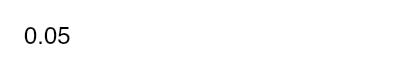
Machine text · preserved
0.5
Enter the text as it appears in the source, or leave it empty if no text is visible.
0 of 3 pages confirmed. Saving a correction does not mark any text as reviewed.
Page 2 has an unresolved flag. Saving this correction does not clear it.
Motion is the loudest signal a page can send. Quiet motion keeps the focus on the content. Every consumer transition lives within the durations below; ambient and rotating UI uses the named keyframes.
The real <TextLink> from @evalgist/design-system. Use it for legal and policy links instead of hand-rolling an anchor className. Pass asChild to wrap next/link; render a plain anchor for external URLs.
For the precise policy, see Privacy, Terms, and Subprocessors.
The full overview lives on evalgist.ai/shortlist.
Interactive controls hover to --accent. On a white card that slate-100 hover reads fine. On the grey canvas (the app shell paints bg-muted), the same hover equals the canvas and the control disappears. Mark a region data-surface="canvas" and the contract remaps hover one step darker; any card nested inside resets it automatically. No per-call-site opt-in.
Hover the buttons above to see it: on the canvas the hover fill is distinct from the grey; inside the card it returns to the standard slate-100. The Select and Input rest on white in both, so they lift off the canvas instead of sinking into it.
<DataTable> wraps the real <Table> in its own card surface with an optional toolbar — a non-scrolling strip on the same surface as the rows. The body scrolls horizontally for wide tables while the toolbar stays put. Distinct from <ActionToolbar>, which is a standalone bulk-action bar that sits above content.
| User | Role | Usage | Status |
|---|---|---|---|
| nora@university.edu | Admin | 3 shortlists | Active |
| viktor@institute.org | User | 1 shortlist | Active |
| lena@college.be | User | 7 shortlists | Suspended |
| User | Role | Usage | Status |
|---|---|---|---|
| nora@university.edu | Admin | 3 shortlists | Active |
| viktor@institute.org | User | 1 shortlist | Active |
| lena@college.be | User | 7 shortlists | Suspended |
| User | Role | Org | Usage | Cost | Status | Created | Last seen | Plan | Actions |
|---|---|---|---|---|---|---|---|---|---|
| nora@university.edu | Admin | University of Ghent | 3 shortlists | €42.10 | Active | 2026-01-14 | 2026-06-16 | Pilot | View · Edit |
| viktor@institute.org | User | Royal Institute | 1 shortlist | €8.75 | Active | 2026-03-02 | 2026-06-15 | Pilot | View · Edit |
| lena@college.be | User | Merelbeke College | 7 shortlists | €118.40 | Suspended | 2025-11-28 | 2026-05-30 | Trial | View · Edit |
<RefreshButton> is an icon-only ghost control: no label competing with the page title. The name lives in an aria-label and a tooltip; the glyph spins and the control disables while a refresh is in flight. It belongs in the page header's actions slot. Requires a TooltipProvider ancestor — the app shell mounts one.
Admin
Find users, inspect usage, grant credits, and manage support status.
<Timeline> renders an ordered list of events on a single connecting rail: the line caps at the first and last dot instead of overshooting. It is data-driven — pass an items array of { label, timestamp, detail }. It never formats dates; the caller passes an already-formatted timestamp so the component stays framework-pure. Used for the analysis audit's processing record.
UploadedAug 25, 2026, 5:45 PM
Criteria confirmedAug 25, 2026, 5:45 PM
Source prepared
Native PDF text
AI check
1 credit · 8 criteria assessed
Reviewer resolutionAug 25, 2026, 5:46 PM
Evidence found · Confirmed against the resume
ScoredAug 25, 2026, 5:47 PM
PublishedAug 25, 2026, 5:51 PM
<MarkdownContent> renders trusted, user-owned Markdown (parsed assessments, vacancy sources) on the design system's type scale — headings, lists, tables, and code, so a round-trippable source reads as a document, not a blob. It is not for untrusted third-party input. Wrap it in a scrollable <SourceExcerpt> to cap height and attribute the source.
Bridge design brief
Design a pedestrian bridge for a 24 m span. Address load, materials, and safety.
- Produce a labelled concept sketch and explain load transfer to the supports.
- Compare steel, timber and reinforced concrete for the deck.
- Identify two safety risks and propose a mitigation for each.
Criterion Weight Structural reasoning 40% Material justification 35% Safety analysis 25%